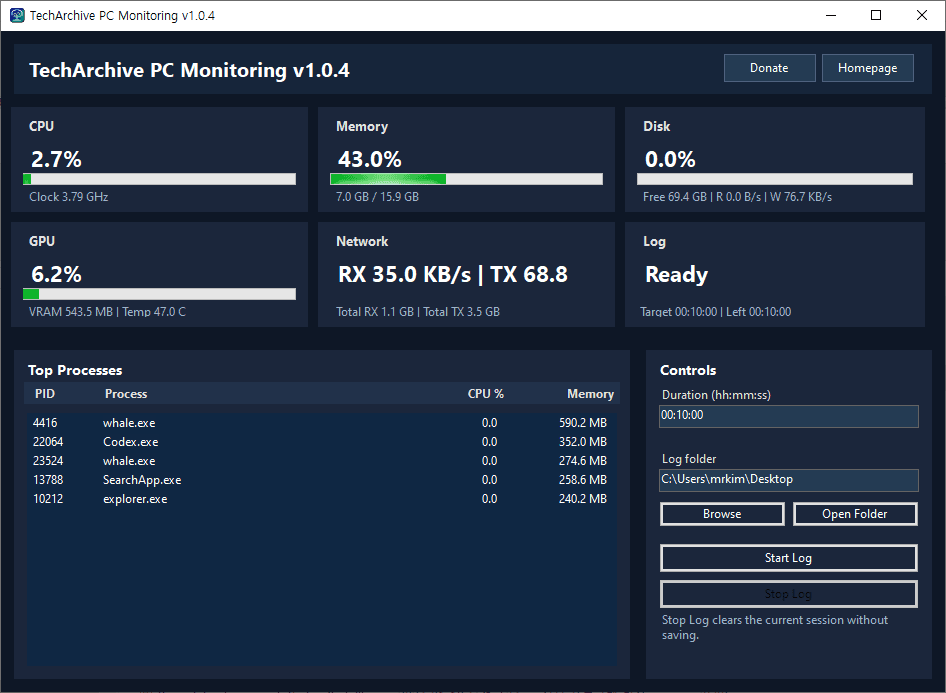
TechArchive PC Monitoring is a lightweight free monitoring program that lets you easily check your PC's key resource status in real time.
You can view CPU usage, CPU clock speed, memory usage, disk usage and read/write speed, GPU usage and VRAM usage, network traffic, and top process activity at a glance on a single screen.
It also supports log recording. After setting the desired duration and starting the log, the program saves the minimum, maximum, and average values of the collected resource data in summary.txt, which is useful for troubleshooting and analyzing usage patterns.
Key Features:
- Displays CPU usage and current clock speed
- Displays memory usage and actual memory consumption
- Displays disk usage, remaining space, and read/write speed
- Displays GPU usage, VRAM usage, and temperature
- Displays real-time network upload/download speed and total traffic
- Displays the Top 5 processes with the highest resource usage
- Supports time-based logging and summary saving
- Automatically checks for updates when the program starts
Recommended Environment:
- Windows 10 / Windows 11 64-bit
Installation:
- Download TechArchive-PC-Monitoring-Setup-1.0.4.zip and extract it to install the program.
TechArchive PC Monitoring은 PC의 주요 리소스 상태를 실시간으로 간편하게 확인할 수 있는 무료 경량 모니터링 프로그램입니다.
CPU 사용률, CPU 클럭, 메모리 사용량, 디스크 사용률과 읽기/쓰기 속도, GPU 사용률과 VRAM 사용량, 네트워크 송수신량, 상위 프로세스 사용 현황을 한 화면에서 직관적으로 확인할 수 있습니다.
로그 기록 기능도 지원합니다. 원하는 시간을 설정한 뒤 로그를 시작하면, 해당 시간 동안 수집된 리소스 정보의 최소값, 최대값, 평균값을 summary.txt 형태로 저장할 수 있어 문제 분석이나 사용 패턴 확인에 유용합니다.
주요 기능:
- CPU 사용률 및 현재 클럭 표시
- 메모리 사용률 및 실제 사용량 표시
- 디스크 사용률, 남은 용량, 읽기/쓰기 속도 표시
- GPU 사용률, VRAM 사용량, 온도 표시
- 네트워크 실시간 송수신 속도 및 총 사용량 표시
- 리소스 점유율이 높은 프로세스 Top 5 표시
- 설정 시간 기준 로그 기록 및 요약 저장
- 프로그램 시작 시 자동 업데이트 확인 지원
권장 환경:
- Windows 10 / Windows 11 64비트
설치 방법:
- TechArchive-PC-Monitoring-Setup-1.0.4.zip 파일을 다운로드한 뒤 압축을 풀면 설치할 수 있습니다.
카테고리 & 태그
Similar Downloads

