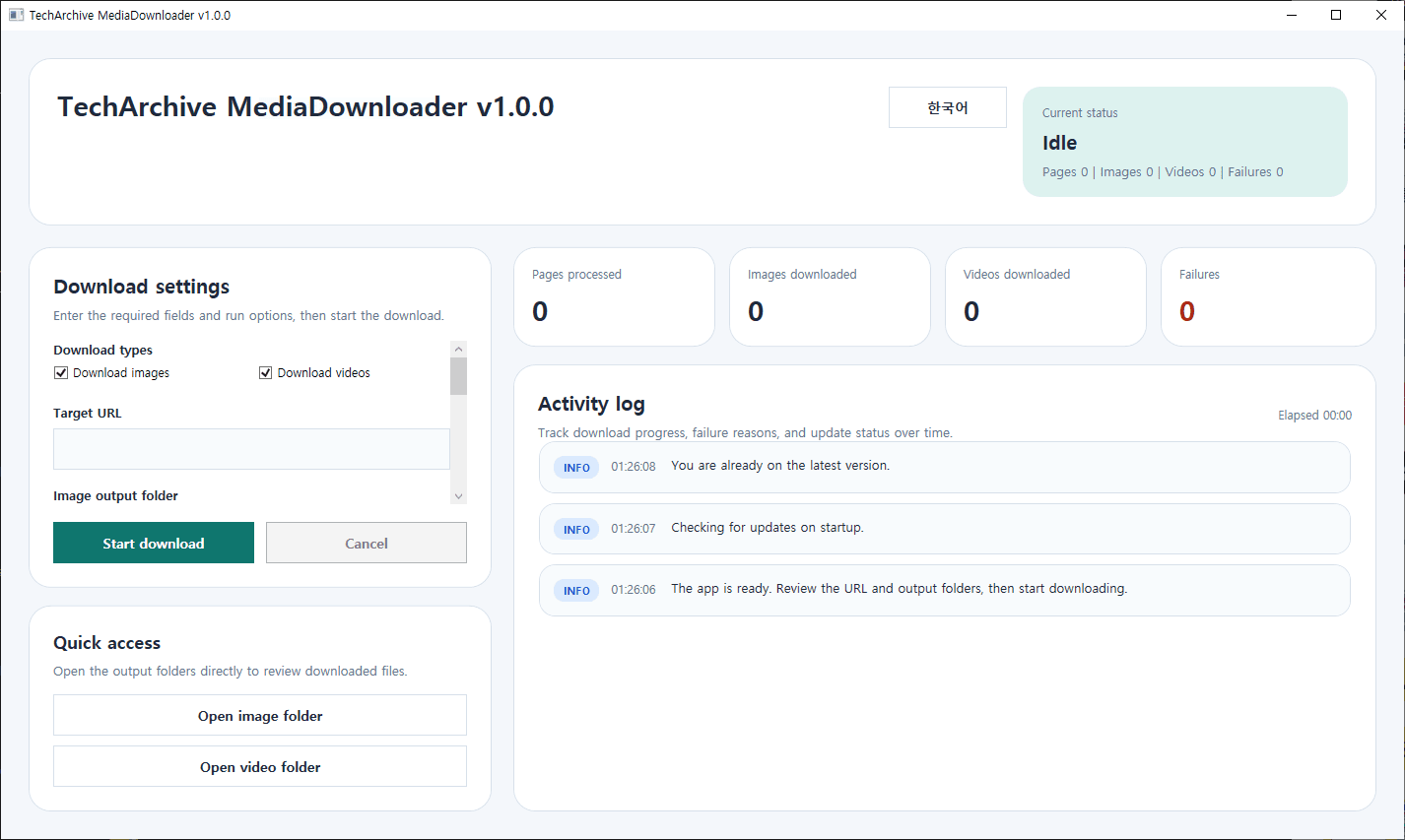
TechArchive MediaDownloader is a free download tool designed to help you easily save original images and videos from web pages.
You can enter the target URL, set separate save paths for images and videos, and choose to download only the formats you need. It also supports retry count and delay settings between files (in milliseconds), making large download tasks more stable and manageable.
Through the Activity Log window, you can monitor download progress, failure reasons, and update status in real time. It also supports Korean/English UI switching. When the program starts, it automatically checks for updates, and if a new version is available, it can download and apply the update right away.
This program may not always work properly depending on the structure of the target web page.
Key Features:
- Supports downloading images and videos from web pages
- Allows separate save paths for images and videos
- Can download images only, videos only, or both
- Supports retry count setting
- Supports delay setting between files (ms)
- Provides an activity log for progress and error tracking
- Supports Korean / English UI switching
- Supports automatic update checking at program startup
Recommended Environment:
Windows 10 / Windows 11 64-bit
Installation:
You can install the program by downloading the file below.
TechArchive MediaDownloader는 웹페이지에 포함된 원본 이미지와 동영상을 손쉽게 저장할 수 있도록 만든 무료 다운로드 프로그램입니다.
다운로드할 URL을 입력하고 이미지/동영상 저장 경로를 각각 지정할 수 있으며, 필요한 형식만 선택해서 받을 수도 있습니다. 리트라이 횟수와 파일 간 딜레이(ms)도 설정할 수 있어 대량 다운로드 작업을 조금 더 안정적으로 진행할 수 있습니다.
활동 로그 창을 통해 다운로드 진행 상황, 실패 원인, 업데이트 상태를 실시간으로 확인할 수 있고, 한글/영문 UI 전환도 지원합니다. 프로그램 시작 시 자동으로 업데이트를 확인하며, 새 버전이 있으면 바로 다운로드 및 적용을 진행할 수 있습니다.
해당 프로그램은 웹페이지 구조에 따라 정상적으로 동작하지 않을 수도 있습니다.
주요 기능:
- 웹페이지의 이미지 및 동영상 다운로드 지원
- 이미지 / 동영상 개별 저장 경로 지정
- 이미지 전용, 동영상 전용, 또는 둘 다 다운로드 가능
- 리트라이 횟수 설정 지원
- 파일 간 딜레이(ms) 설정 지원
- 활동 로그를 통한 진행 상태 및 오류 확인
- 한글 / 영문 UI 전환 지원
- 프로그램 시작 시 자동 업데이트 확인 지원
권장 환경:
Windows 10 / Windows 11 64비트
설치 방법:
아래 파일을 다운로드하면 설치할 수 있습니다.
카테고리 & 태그
Similar Downloads

